




Designing an accessible website means much more than just ticking technical boxes. It's about opening digital doors for every to open up and ensure that everyone can access your content without restrictions. What was often dismissed as a niche topic in the past is now a clear strategic necessity – both from a legal and an economic perspective.
Why digital accessibility is no longer a fringe issue
The belief that online accessibility only benefits a small, specific group is a persistent myth. Reality is quite different and makes it clear why this topic belongs in every company's strategy. The question is no longer..., whether one needs an accessible website, but How how best to implement them.
A look at the figures for Germany immediately makes the scale clear. According to the Federal Statistical Office, around [number missing] people lived in Germany in 2024. 7.9 million people with a severe disability. This means that almost one in ten citizens potentially relies on accessible digital services to participate in social life. A joint study by Aktion Mensch and Google reveals the vast gap between supply and demand: only one-fifth of major German online shops meet accessibility criteria. This represents a huge, untapped potential.
More than just a law on paper
A strong driving force is the Accessibility Strengthening Act (BFSG). It is binding from the June 28, 2025 Many companies are being urged to make their digital products and services accessible. This applies particularly to e-commerce and the service sector. Those who ignore this deadline risk not only substantial fines but also significant reputational damage.
But the true value of digital inclusion goes far beyond simply complying with the law. An accessible website sends a strong signal of social responsibility and directly contributes to a positive brand image.
An accessible website is not a cost factor, but an investment in a larger target audience, a better user experience for everyone, and stronger customer loyalty. It transforms a legal obligation into a business opportunity.
The benefits are directly measurable and have a positive impact on overall business success.
An overview of the business benefits of accessibility
Choosing accessibility is a strategic decision with many positive side effects. It not only improves access for people with disabilities but also optimizes the overall user experience. This table summarizes the most important benefits that go beyond mere legal compliance and highlight the business advantages.
| Advantage | Description | Concrete benefits |
|---|---|---|
| Market expansion | They open up a target group of millions of potential customers who were previously excluded from using them. | Direct revenue increase through new customer segments. |
| Improved User Experience | Clear structures, simple navigation and high readability benefit all users, e.g. on mobile devices or in areas with poor network coverage. | Lower bounce rates, longer dwell time, and better conversion rates. |
| Stronger brand image | An inclusive approach positions your company as modern, customer-oriented, and socially responsible. | Positive brand perception and increased customer loyalty. |
| SEO benefits | Many criteria (semantic HTML, alt texts) are direct ranking factors for Google and improve visibility. | Better ranking in search engines and more organic traffic. |
Choosing accessibility is therefore a clear win-win situation. It benefits your brand, improves user-friendliness, and demonstrably increases your reach.
Incidentally, inclusion is not purely a digital issue. It is just as important in the physical world, as the example of... Accessibility in the doctor's office shows.
Ultimately, an accessible website is not only an ethical imperative, but also a smart move for your business. If you'd like to delve deeper into the topic, you'll find further insights in our related article., why accessibility is so important for websites.
The most important standards and laws – explained in an easy-to-understand way
Anyone wanting to build an accessible website needs to know the rules of the game. But don't worry, you don't need to be a lawyer. Essentially, it's about understanding internationally recognized standards and knowing how they've been translated into German law.
The global pace is set by Web Content Accessibility Guidelines (WCAG) These guidelines are essentially the global standard and provide very specific, technical recommendations on how to make web content accessible to everyone.
WCAG: The foundation for everything else
The WCAG is developed by the Web Accessibility Initiative (WAI) of the World Wide Web Consortium (W3C). To measure the degree of accessibility, there are three conformance levels that build upon each other:
- Level A: This is the absolute basic requirement. Without meeting these criteria, some user groups will not be able to access your content at all.
- Level AA: Here we are operating within the current standard. This level is the legal requirement for most public and private providers and removes the biggest and most common barriers.
- Level AAA: This is the top tier. This level is often only achievable with considerable effort and is usually sought for special offers specifically aimed at people with disabilities.
For most companies and online shops, the Conformity to WCAG 2.1 Level AA The golden mean. This ensures that your website is easily usable for the vast majority of people without making the implementation disproportionately complex.
The following screenshot of the official W3C website provides a good overview of the different guidelines and their structure.
It is immediately apparent how central WCAG is as the foundation for digital accessibility worldwide.
From directive to German law
International guidelines like WCAG are initially just recommendations. They only become legally binding when the legislature incorporates them into national law. And this is precisely where things get interesting for you as a website operator in Germany.
Firstly, there would be the Accessible Information Technology Ordinance (BITV 2.0). It can be thought of as the official German translation of WCAG. It is based on the European standard EN 301 549, which in turn is based on WCAG. Originally, the BITV only applied to federal authorities and public bodies, but its principles have long since established themselves as a general guideline.
However, what is truly crucial for most companies is this. Accessibility Strengthening Act (BFSG). It implements the „European Accessibility Act“ (EAA) into German law, thus making accessibility mandatory for many private companies as well.
This law is the real turning point. It makes it clear: An accessible website is no longer a nice gesture, but for many a clear legal obligation.
What the BFSG specifically means for you
The deadline is June 28, 2025. From then on, all new products and services coming onto the market must be accessible. This affects a whole range of digital offerings, most notably:
- Online shops: Every form of e-commerce is included.
- Digital services: This includes, for example, banking services, apps from transport providers, or electronic communication services.
- Websites and mobile apps: All digital channels through which these services and products are offered.
In plain terms, this means that if you run an online shop or offer services through your website, you must ensure that these comply with current standards – essentially WCAG 2.1 AA. Those who ignore this not only risk warnings or fines, but also exclude valuable customer groups from the outset. The laws therefore not only provide the framework, but also create a clear roadmap for implementation.
Plan accessibility correctly from the start

Anyone who Create an accessible website Anyone who wants to achieve this should avoid a crucial mistake: viewing accessibility as a bothersome item on a to-do list to be quickly ticked off at the end. True digital inclusion is not an add-on, but the foundation. It must be an integral part of strategic planning from the very first idea – an approach also known as "accessibility by design".
This proactive approach might initially feel like more work, but the reality is: it saves a tremendous amount of time, money, and stress later on, avoiding costly revisions. It's like building a house – adding a ramp later is always more complicated and less elegant than planning for barrier-free access from the outset.
Think in terms of people, not statistics.
The first and perhaps most important step in the design process is to develop a genuine understanding of the users. While many teams work with personas, people with disabilities are rarely included. Do better: consciously expand your personas to include characters with various limitations.
For example, imagine these specific people:
- Anna, the blind academic: She relies on a screen reader and navigates your site completely without sight. For her, a clean HTML structure, logical headings, and meaningful alternative text for images are not "nice to have," but absolutely essential.
- Markus, the gamer with motor impairment: He cannot use a mouse. His tools are the keyboard or special input devices. A logical tab order and a clearly visible focus indicator are crucial for him to be able to navigate the page at all.
- Sabine, the hard-of-hearing pensioner: She appreciates the video testimonials on your site, but cannot follow them without precise subtitles or a full transcript.
Such scenarios make accessibility tangible. Suddenly, it's no longer about abstract rules, but about solving real problems for real people. These insights can be directly translated into user stories and technical requirements.
Choose the technology wisely
The choice of technical foundation can make or break your project. Not every content management system (CMS), theme, or plugin is accessible. A poorly considered decision at the beginning will later lead to countless workarounds and poor compromises.
Before you make a decision, take a close look at the technologies under consideration. WordPress For example, the Gutenberg editor offers a solid foundation, but actual accessibility depends heavily on the chosen theme and installed plugins. Specifically look for providers that advertise accessibility as a feature and publish an "Accessibility Statement".
A clear commitment to accessibility from the manufacturer is often a good indicator. If there's no mention of it at all, that should raise red flags. Fixing a poorly programmed theme later can quickly become more expensive than a well-thought-out initial investment.
The economic aspect is often underestimated. A survey of German companies showed that 38 percent They were able to increase their revenue by implementing inclusive web design. Accessibility is therefore not only an ethical obligation, but also a smart business decision. You can learn more about this in the Analysis on increasing revenue through AI and accessibility.
Orientation towards the four principles of WCAG
The Web Content Accessibility Guidelines (WCAGThese principles are not a dry set of rules, but a tried-and-tested framework that supports you in all your design and development decisions. The four basic principles are easy to understand and serve as guidelines for the entire process:
- Perceivability: Can all users see or hear your content? This ranges from alternative text for images and subtitles for videos to sufficient color contrast.
- Ease of use: Is your website usable by everyone? This refers to complete keyboard navigation and giving users enough time to interact.
- Comprehensibility: Is everything clear and easy to understand? Simple language, predictable navigation, and helpful error messages in forms are key here.
- Robustness: Does your website function reliably with different technologies? Clean, standards-compliant code ensures that screen readers and other assistive technologies can interpret everything correctly.
If you keep these four pillars in mind at every stage – from the initial sketch to the final code – accessibility becomes a predictable process and not a guessing game at the end of the project.
Design and Code: Where Accessibility Takes Shape
Once the strategy is clear, it's time to get down to brass tacks: implementation. Creating an accessible website, is a true team effort between design and development. Here, visual design meets clean, semantic code, and the common goal is a product that truly works for everyone.
In this phase, theory becomes practice. We translate the abstract requirements of WCAG into concrete design decisions and lines of code. For designers, this means thinking beyond mere aesthetics. Developers, in turn, must understand the meaning behind each HTML tag and use it strategically.
Good design is for everyone.
Truly good accessible design is barely noticeable. It simply feels right and intuitive – for everyone. Behind this lie a few fundamental principles that have nothing to do with personal taste.
A classic is the color contrast. If text barely stands out from the background, this is a deal-breaker not only for people with visual impairments. Anyone who has ever looked at their phone in bright sunlight knows the problem. The WCAG AA level specifies a clear value here: a contrast ratio of at least 4.5:1 For normal text. Fortunately, there are tons of free online tools that allow you to check this even in the design draft.
Equally crucial is the Legibility of the font. A clear, well-designed font in a sufficient size (I recommend at least 16 pixels for body text as a starting point) is half the battle. Avoid playful, ultra-thin, or purely decorative fonts for important content. Short paragraphs and generous line spacing do the rest—a blessing, especially on small screens.
Accessible design is not a compromise that limits creativity. It's a design challenge that forces us to communicate more clearly. It focuses on the essentials – a discipline that ultimately benefits every website.
Interactive elements like buttons and links must be instantly recognizable. A simple, underlined link is universally understandable. If the design omits this, the link must stand out clearly elsewhere, for example, through a combination of color and bold text. And very importantly: the Focus stateAnyone navigating the site using the keyboard must be able to see their location at all times. A clear frame or color highlight is therefore essential.
The technical foundation: The code
While design is the facade, code forms the invisible but crucial foundation. Without clean, semantic HTML code, accessibility is simply impossible.
Semantic HTML5 To use means to use the right building blocks for the right purpose. A headline is, after all, a <h1> until <h6>, a paragraph a <p> and a list <div>s and <span>These headings are purely for visual appeal, never intended to feign structure. Screen readers use precisely this semantic information to explain to users how the page is structured. A logical, correct heading hierarchy is therefore essential for navigation.
Sometimes, pure HTML isn't enough. Here's where the... Accessible Rich Internet Applications (ARIA) roles into play. With ARIA attributes, we can add extra information to HTML elements. A aria-label For example, you can add the description "Close menu" to a button that only shows an "X" for screen readers: . ARIA is extremely useful, but you can also make a lot of mistakes with it. The golden rule is: always use native HTML elements whenever possible. It comes with everything you need right out of the box. <div>, which is converted into a button using JavaScript, needs a lot of ARIA tutoring.
Forms deserve special attention. Each input field () needs a clearly assigned , This describes what is expected. Placeholder text is not a substitute. Error messages must be precise, understandable, and directly linked to the affected field, ideally via... aria-describedby.
Would you like to refresh your knowledge of the fundamental principles of accessibility? Our article on the 5 characteristics of accessible websites summarizes the most important points concisely.
Practical checklist for accessible web design
To keep track of everything during implementation, a checklist can work wonders. Here are some of the most important points that designers and developers should keep in mind.
| Area | Requirement | WCAG criterion (example) |
|---|---|---|
| design | Color contrast of at least 4.5:1 for text | 1.4.3 Contrast (Minimum) |
| design | Interactive elements clearly identifiable as such | 2.4.7 Focus visible |
| code | Logical and hierarchical heading structure | 1.3.1 Information and Relationships |
| code | Meaningful alternative text for images | 1.1.1 Non-text content |
| code | All form fields have an assigned label. | 3.3.2 Labels |
| interaction | Full keyboard operation | 2.1.1 Keyboard operability |
These points are of course only the beginning, but they already cover a large part of what makes a website accessible.
Ultimately, it is this combination of thoughtful design and clean code that lays the foundation for a truly inclusive digital experience.
Check and optimize your website for accessibility
A clean technical implementation is a fantastic start, but a truly accessible website only proves its quality in practical use. Now comes the crucial part: testing and optimization. This is where it becomes clear whether the concepts from the design and development phases also work in the real world. It's about systematically identifying the barriers we may have overlooked so far.
A truly effective testing process always combines the strengths of humans and machines. Automated tools are brilliant aids for quickly finding a large number of potential problems. But they are only the first step.
The following infographic clearly shows that testing is not a one-off event, but a fixed, recurring part of the entire process.
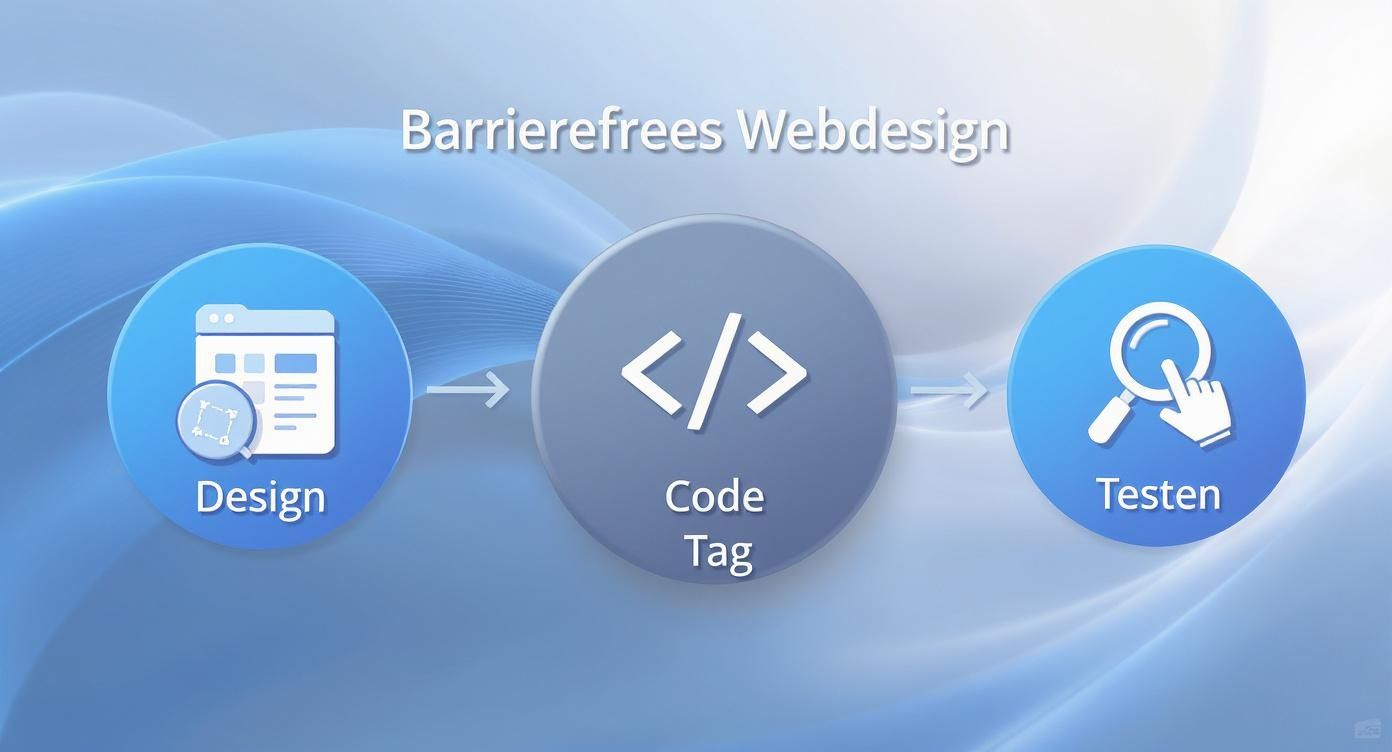
It's immediately clear: testing is not a separate phase at the end, but deeply interwoven with design and code.
The first check using automated tools
Automated tools like browser extensions offer the perfect starting point. WAVE or aXe. They scan a website in seconds and highlight everything a machine can detect – missing alt text, insufficient color contrast, or faulty ARIA implementations.
These tools provide a quick overview and help eliminate the most obvious defects, ensuring a basic level of technical quality. However, they do have their limitations. While a tool can check, whether An image has alt text, but not..., whether this text is actually meaningful and describes the picture well.
Automated tests find the "known unknowns"—that is, errors we know we need to look for. However, they cannot uncover the truly critical barriers that only arise in the context of use.
Manual testing: The irreplaceable human perspective
After the automated scan, the real detective work begins. In manual tests, we simulate usage by people with various disabilities. The goal here is to experience the user experience firsthand.
Every team should have two fundamental manual tests on their radar:
- Keyboard navigation: Unplug your mouse or turn off your trackpad. Now try browsing the entire website using only the Tab key (forward), Shift+Tab (back) and the Enter key (trigger) to operate. Can you reach every interactive element? Is the focus always clearly visible? Do all menus and forms function smoothly?
- The screen reader test: Install a free screen reader such as NVDA (for Windows) or activate VoiceOver (on Apple devices). Close your eyes and have the page read aloud. Does the order make sense? Are links and buttons announced clearly? Do the headings provide good orientation? This test often mercilessly reveals weaknesses in the semantic structure of the HTML code.
The results of these tests are invaluable because they uncover problems that no algorithm can find. And that's urgently needed, because the current situation in Germany is sobering. A study by Google and Aktion Mensch has shown that two-thirds of the major German online shops are not accessible. This means millions of people encounter digital barriers every day. Although the legal obligation to make them accessible from the June 28, 2025 While it is supposed to bring improvement, progress has been slow so far. More about the You can read more about the background of this study at aktion-mensch.de.
Nothing replaces testing with real users.
The ultimate reality check is and remains testing with people who rely on assistive technologies on a daily basis. Only they can provide authentic feedback on where a well-intentioned feature becomes an insurmountable obstacle in practice.
Organizing such tests is easier than you might think. You can use specialized agencies or cooperate directly with disability associations and organizations. Ask the test subjects to complete specific tasks (e.g., "Find product X and add it to the shopping cart") and observe them as they do so.
The insights are often eye-opening and reveal problems that no one on the team had considered. This feedback is the most valuable resource for making a website not just compliant, but truly effective. usable to do this. Incidentally, a focus on a positive user experience is also a key factor when you're developing your Optimize website for Google want.
Frequently asked questions about digital accessibility
Anyone who is dealing intensively with a accessible website, This quickly leads to recurring questions. No wonder, as the topic is multifaceted. Here, we shed light on the subject and provide you with practical answers to the most pressing questions – from costs and the hype surrounding AI solutions to how to stay competitive in the long term.
What does an accessible website really cost?
The budget question is usually the first thing that comes up. Giving a general figure would be irresponsible, as the costs naturally depend heavily on your project. A simple company blog has completely different requirements than a huge online shop with thousands of products and complex filter functions.
The most important rule of thumb from practical experience is: considering accessibility from the outset is always cheaper than laboriously adding it on later. If accessibility is an integral part of the concept and design phase, the additional costs often remain within a manageable range of approximately... 5 % to 15 % of the total budget. Making an existing website accessible retroactively, on the other hand, can be really expensive because it often requires deep intervention in the code, structure, and design.
View it as a smart investment, not just a cost. Typically, the costs break down as follows:
- Audit & Consulting: First, someone needs to analyze where the obstacles on the current page actually lie and create a clear action plan.
- Design & UX: This involves adjusting color contrasts, font sizes, clickable areas, and general user guidance.
- Technical implementation: That's often the biggest part – adjustments to the HTML, CSS, and JavaScript. Sometimes, a complete relaunch is even the best way.
- Testing: Ultimately, everything must be thoroughly tested, not only automatically but also manually – ideally directly with people who rely on assistive technologies.
Can't AI tools simply automate accessibility?
Artificial intelligence promises to simplify many complex tasks – including in web development. One frequently encounters so-called "accessibility overlays" or AI widgets that advertise making a website accessible with just one click. These tools essentially overlay an additional layer on the page and then attempt to automatically correct problems such as missing alternative text for images or insufficient contrast.
Sounds tempting, right? Unfortunately, reality is quite different. These tools only scratch the surface. While they can find a few simple errors, they fail when it comes to the really important, structural problems. An illogical heading hierarchy, a broken form, or a complex menu that can't be navigated with the keyboard – AI simply can't handle these. Sometimes, these overlays even make the situation worse because they don't work well with screen readers and other assistive technologies.
AI can be a useful tool, for example, to generate initial suggestions for image descriptions. But it will never replace careful planning, human understanding, and thorough manual testing. True accessibility must be embedded from the ground up in the code and the concept of a website.
How can I ensure that my website remains accessible?
Successfully launching an accessible website is a huge achievement. But the work doesn't end there. Accessibility isn't a project you complete once and then forget about – it's an ongoing process. Every new subpage, every new feature, and every software update can unknowingly create new barriers.
To ensure long-term accessibility, you need a clear strategy. The most important thing is to establish consistent processes within the team so that accessibility is automatically considered in every future change.
A few tried-and-tested tips for everyday life:
- Train your team: Make sure that everyone working on the website – from editorial staff to development – knows and understands the basics of accessibility.
- Use checklists: Create simple checklists for new content. Does the image have meaningful alternative text? Are there subtitles for the new video? Is the heading structure appropriate?
- Schedule regular checks: Make it a point to, for example, check the most important pages once a year using automated tools and to perform short manual tests. This will prevent unpleasant surprises.
- Set up a feedback channel: Make it as easy as possible for your users to report accessibility barriers. A clearly visible email address or a contact form specifically designed for accessibility issues can be invaluable.
This continuous maintenance ensures that your website is accessible to everyone not only today, but also in the future, and that you remain legally compliant.
A professionally designed, accessible website is your key to greater reach and a better ranking on Google. We at LinkITUp We bring over 15 years of experience to sustainably strengthen your online presence. From keyword analysis to technical optimization, we ensure that your website is not only found, but also functions perfectly for absolutely everyone. Learn more about our SEO services and get started now.