





Image SEO optimization is about preparing images so that search engines like Google not only see them, but also understand, index and rank well. This is more than just a technical trick. It means intelligently compressing image files, giving them descriptive filenames, and adding relevant alt text. The goal? More organic traffic via image search.
Why most people fail at image SEO optimization

For many, images on a website are still purely decorative – a way to break up long blocks of text. This very mindset is the reason why so much potential is simply wasted. Image SEO optimization It is often dismissed as a "nice-to-have" and not as what it truly is: a fundamental pillar for online success.
This misconception leads to fundamental errors being commonplace and actively sabotaging one's own ranking. Images are often uploaded directly from the camera or a stock photo database – without giving a single thought to file size, file names, or descriptive text.
The untapped potential in numbers
The consequences of this negligence are anything but theoretical, especially in the German market. Current data paints a bleak picture: In Germany, only 26 % The alt text of websites. Conversely, this means that over 74 % of the images They are virtually invisible to search engines and screen readers.
Simultaneously charging 36 % The websites upload huge image files, which drastically reduce loading times. With a mobile search share of over 65 % This is fatal, because 53 % Mobile users leave a page if they stay longer than 3 seconds invites. More such facts can be found in the SEO statistics from seranking.com.
These figures prove that this is not about minor details. These are tangible disadvantages that directly impact user experience and search engine ranking.
Errors in image optimization are not trivial offenses. They often have direct and noticeable consequences that can develop into a real problem for a website's performance over time.
Common mistakes and their direct SEO impact
| Mistake | Direct impact | Long-term consequence |
|---|---|---|
| Missing alt text | Google cannot understand the image content. | Missed rankings in image search, poorer accessibility. |
| Image files too large | The page load time (LCP) increases drastically. | Higher bounce rate, worse Core Web Vitals, lower ranking. |
| Generic file names | Missed opportunity to place keywords in the file name. | Lower relevance for specific search queries. |
| Incorrect image format | Unnecessarily large files, poor quality, or incompatibility. | Poor user experience, longer loading times. |
| No responsive design | Images are displayed incorrectly on mobile devices. | Negative user signals (drop-offs), worse mobile rankings. |
Each of these points may seem small on its own, but together they massively slow down a website.
More than just decoration
A strategic approach to images is so much more than mere aesthetics. When properly optimized, they become a powerful tool that strengthens several areas of your website:
- Improved visibility: Their images appear in Google image search, opening up a completely new source of traffic.
- Faster loading times: Compressed images speed up your entire page – a crucial ranking factor (keyword: Core Web Vitals).
- Stronger user engagement: Fast loading pages and relevant images keep visitors longer and reduce the bounce rate.
- True accessibility: Meaningful alt text makes your content accessible to people who rely on screen readers.
Images are not passive elements, but active players in your SEO strategy. Every single unoptimized image is a missed opportunity to increase your reach and achieve your business goals.
Ignoring image SEO is like driving with the handbrake on. You might make some progress, but nowhere near as fast and efficiently as you could. And the competition, already leveraging this potential, will inevitably overtake you. It's high time to treat images for what they are: a crucial lever for your online success.
Technical basics: The foundation for fast and sharp images
Before Google even glances at the content of your images, the technical foundation must be sound. Quite frankly, slow-loading, huge image files are one of the most common reasons why visitors get frustrated and leave. Therefore, proper technical optimization isn't just a "nice-to-have," but the absolute foundation for successful image SEO.
The performance of your visual content directly impacts the user experience. Imagine an online shop: if the product images take forever to focus, trust is lost and the impulse to buy disappears. The same applies to technical articles – to make complex content understandable with detailed graphics, lightning-fast rendering is essential. optimized images Simply essential.
The right format for every purpose
Choosing an image format is more than just a technical formality; it's a strategic decision between file size, quality, and functionality. There is no single "right" way. one Perfect format, but the optimal solution for every application.
Here are the most common options and what I use them for:
- JPEG (JPG): The undisputed classic for photos. It compresses complex images with many color gradients superbly, without any visible loss of quality to the human eye.
- PNG: PNG is always my first choice when I need transparency – for logos, icons, or isolated graphics. PNG compresses without loss of quality, but this often results in larger files than with JPEGs.
- WebP: This format, developed by Google, is a true all-rounder. It supports lossy and lossless compression as well as transparency. The key advantage: WebP images are often of the same quality. 25–35 % smaller than their JPEG or PNG counterparts.
- AVIF: The newest format in the lineup and a true champion when it comes to compression. AVIF delivers even better performance than WebP, making it ideal for high-resolution images with minimal file size. The only drawback is its not yet complete support in older browsers.
In practice, a combined strategy has proven effective for most websites: delivering WebP as the default and providing a JPEG as a fallback for older browsers. This ensures that most users get a fast experience, and no one is left out.
Compression: The key to speed
Once you've chosen a format, the most important step is compression. The goal is to reduce the file size as much as possible without noticeably compromising image quality. Sometimes this is a delicate balancing act, but the effort is always worthwhile.
Good image compression can easily reduce the file size by up to... 70 % reduce it. This single step alone has a huge impact on your charging time and especially on the Largest Contentful Paint (LCP) – one of the most important key performance indicators of the Core Web Vitals.
Modern tools and CMS plugins often take this work off your hands and automatically compress images upon upload. They remove unnecessary metadata and intelligently find the best balance. We've also discussed in detail how all of this affects your ranking in our guide to... Google Core Web Vitals explained.
Responsive images and lazy loading: Intelligent loading for every device
We live in a multi-device world. Your website is accessed on tiny smartphones and huge 4K monitors. It would be a pure waste to send every user the same massive image file. Fortunately, there are smart solutions for this.
Responsive Images with srcset
The srcset-attribute in <img>The `<img>` tag is an elegant way to let the browser do the work. You simply provide multiple versions of an image in different sizes, and the browser automatically selects the appropriate file for each screen size and resolution. This saves a huge amount of data, especially on mobile devices.
Lazy loading for faster page startup
Lazy loading simply means "lazy loading." Images are only loaded when they scroll into the user's visible area. Images located further down the page ("below the fold") therefore don't slow down the initial page load. Most modern content management systems, such as WordPress, now include this feature by default.
The turbo boost: Delivering images via a Content Delivery Network
A Content Delivery Network (CDN) is the final piece of the puzzle for a globally fast website. Instead of all visitors having to load your images from a single server location, for example in Germany, a CDN distributes copies of your files across a global network of servers.
If someone from the USA visits your site, the images are delivered from the nearest server in the USA. This drastically reduces loading time (latency) and ensures a consistently fast experience, no matter where in the world your customers are located. Many good hosting providers now have a CDN integrated directly into their packages, making setup incredibly easy.
Alt text and file names that Google understands
The best technical foundation is only half the battle. If Google and other search engines can't interpret the actual content of your images, their full potential remains untapped. Now we'll take care of the content side of things. Image SEO – that is, all the small but crucial details that give context and meaning to search crawlers.
Imagine it like this: You're speaking directly to Google. Every image should tell a story, and that story begins long before you even upload it to your website.
The first message: File names with a signaling effect
The filename is often the very first point of contact a search engine crawler has with your image. A generic name like IMG_7812.jpg or stock photo-business-man.jpg It's a huge missed opportunity. It says absolutely nothing about the context.
A meaningful filename, on the other hand, is like a clear label on a wine bottle – it immediately reveals what's inside. This provides valuable information and can already contain the keywords that will boost your visibility for specific search queries.
Let's take a practical example: You run a bakery here in Kaiserslautern and have just photographed a beautiful, fresh rye bread.
- Bad:
bread.jpg - Better:
rye bread-kaiserslautern.jpg - Optimal:
handwerklich-gebackenes-roggenbrot-baeckerei-mueller-kaiserslautern.jpg
This tiny adjustment takes only seconds but sends a strong signal to Google. The rule is simple: Describe precisely what is shown in the image and separate the words with hyphens.
Alt texts: the bridge between SEO and accessibility
Alt text (short for alternative text) is probably the most important content element in image SEO. Its original function is accessibility: it is read aloud by screen readers and describes to visually impaired users what is shown in an image.
At the same time, alt text is a goldmine for Google to understand and thematically categorize the image content. A well-written alt text therefore not only improves the user experience for... all, but is also a direct ranking factor for image search.
A missing alt text isn't just bad for SEO; it also actively excludes a portion of your potential visitors from your content. My tip: Always think of the user first, then the search engine. What's good for the user is usually perfect for Google, too.
An effective alt text is descriptive, but not a place to mindlessly string together keywords. It should be concise and sound natural.
A real-world example:
- Bad alt text:
Picture - Acceptable alt text:
Dog plays with ball - Excellent alt text:
A brown Labrador Retriever catches a red ball in flight on a green meadow.
Do you see the difference? The last text not only contains keywords, but also the important context that Google loves.
The following process shows how the technical basis is created on which these content optimizations can then have their full effect.
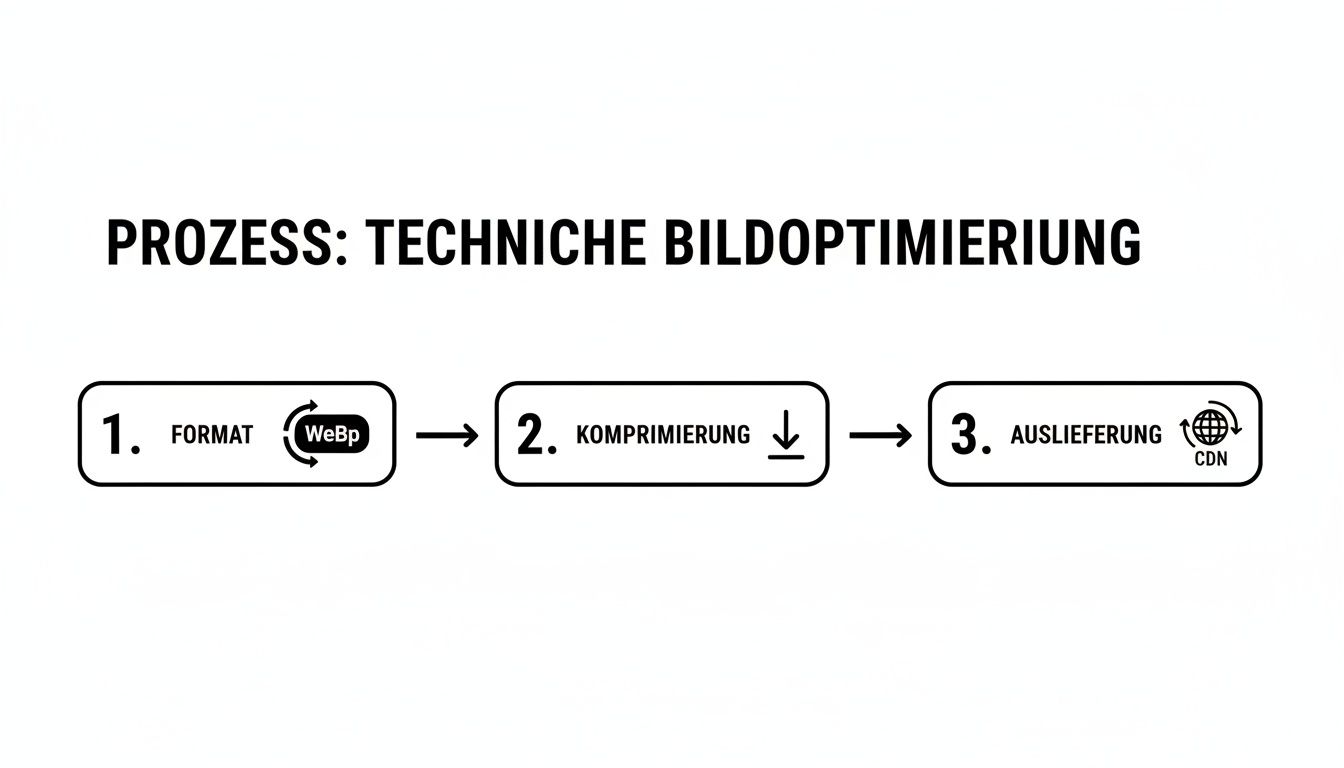
As the graphic illustrates, the correct format (e.g. WebPStrong compression and fast delivery via CDN form the basis. Only then can elements like alt text reach their full potential.
Title, caption and context: the supporting elements
While the filename and alt text play the main roles, there are other text elements that contribute to image SEO as important supporting actors.
The strategic role of the various image elements
| element | Main purpose | Visibility for users | SEO impact |
|---|---|---|---|
| File name | Identification for crawlers before upload | Never directly visible | High (Relevance Signal) |
| Alt text | Accessibility, crawler context | In case of loading errors, for screen readers | Very high (ranking factor) |
Image title (title) | Additional information on mouseover | Yes, as a tooltip | Small amount |
| Caption | Direct description for the reader | Yes, under the picture | Means (context, user experience) |
The Image title It appears when you hover your mouse over the image. Its SEO relevance is low, so it can often be omitted – unless it offers genuine added value for the user.
The Caption However, this information is invaluable. It's located directly below the image and is often noticed very carefully by readers. Here you can delve deeper into the context and offer an interpretation of what you've seen.
Last but not least, the surrounding text Crucially, Google analyzes the paragraphs and headings surrounding an image to assess its relevance to the overall topic of the page. For example, an image of a laptop on a page about the best business notebooks. 2024 They will rank significantly better than on a page about garden tools. Therefore, ensure that your images are always perfectly integrated into the text.
Maximize visibility with structured data and sitemaps
Okay, the technical and content-related foundations for your images are in place. Now we're going to take it to the next level. It's not enough for Google to just sort of index your images. understands – We want to tell the search engine very clearly: „Hey, look, these are my most important images, and here’s everything you need to know about them.“
That's precisely what structured data and special image sitemaps are for. This isn't technical hocus-pocus, but rather a crystal-clear instruction to the Googlebot. This makes your images stand out from the crowd, speeds up indexing, and might even qualify them for rich results – those eye-catching special entries in Google search that immediately grab attention.
Use schema markup to specify the context
Structured data, often also called schema markup, is essentially a standardized "cheat sheet" for search engines that you integrate directly into your page's HTML code. For images, this is particularly relevant... ImageObject Crucial. It allows you to feed Google specific information and thus rule out possible misunderstandings from the outset.
Instead of letting Google guess what the image shows based solely on the alt text and surrounding body text, provide the facts directly: What does it show, where is the file located, who holds the copyright? This builds trust and appears professional.

This code snippet allows Google to directly read important image details such as the URL, height, and width. This greatly helps with correct display in search results.
Think of structured data markup as a detailed instruction leaflet for your images. They proactively answer Google's most important questions, thereby increasing the chance that your images will be correctly understood and prominently placed.
Some of the most important fields in ImageObject-Schema are:
nameA short, snappy title for the image. It can resemble the alt text, but should sound more like a headline.contentUrlThe direct URL to the image file. Absolutely. essential, so that Google can find and crawl the image.licenseA link to a licensing page. This is invaluable if you want your images to appear as licensable in Google search results.acquireLicensePage: The URL where a user can purchase a license for your image.
Fortunately, you don't have to type this code manually. Most modern SEO plugins for systems like WordPress (e.g., Rank Math or Yoast SEO) do it for you and automatically insert the markup in the background.
When an image sitemap makes the crucial difference
You're probably familiar with a standard XML sitemap: it's a list of all your subpages, which makes it easier for Google to crawl them. Image Sitemap It essentially does the same thing, but only for your images. It's a separate file where you list all the images you want Google to index – including additional metadata for each individual image.
But is it always really necessary? Here are a few cases where an image sitemap makes perfect sense:
- For image-heavy websites: Do you run an online shop, a photography portfolio, or a design blog? Then an image sitemap is essential.
- When images are loaded via JavaScript: Sometimes images are not directly visible in the source code, but are only loaded through user action. A sitemap ensures that Google can still find them.
- For completely new content: Do you frequently publish many new images? A sitemap can significantly speed up the indexing process.
The structure is quite logical: For each page with images, there is a <url>-entry. In it, you then list with the <image:image>-Tag for each image that should be indexed.
For the general basics on the topic of sitemaps, we also have a suitable guide that shows you how to create one. Create an XML sitemap. The combination of clean, structured data and a complete image sitemap is an unbeatable duo to get the most out of your image SEO.
Tools and analytics: How to measure the success of your image SEO
Optimization isn't a one-off thing you can check off a list and forget about. It's an ongoing process. You need to know what's working and where there are still problems. Fortunately, there are a number of powerful tools available to help you track the success of your optimization efforts. Image SEO optimization You can keep a close eye on it. Without this data, you're groping in the dark.
The first and most important checkpoint is always performance. The best alt text and filenames are completely useless if your images drag down the entire page's loading time. This is precisely where it comes in. Google PageSpeed Insights into play – a free tool that gives you ruthlessly honest feedback.
Under control of loading times? A check with Google PageSpeed Insights.
Google PageSpeed Insights examines your website and shows you precisely how your images affect the important Core Web Vitals. The tool measures loading times and identifies the biggest bottlenecks. These are usually images that haven't been compressed correctly, lack lazy loading, or are still in outdated formats like JPG instead of WebP.
The great thing about it: The recommendations are extremely practical. PageSpeed Insights doesn't just tell you, that Instead of compressing images, it often provides optimized versions for download. It clearly shows you which images are too large for a file size. Largest Contentful Paint (LCP) are responsible.
This is what an analysis report in PageSpeed Insights might look like, showing you targeted optimization opportunities.
This report clearly shows which elements – such as images in modern formats – have the greatest impact on performance. By implementing these specific recommendations, you will not only improve loading times but also directly boost your ranking potential.
How are your images performing? The answer lies in the Google Search Console.
While PageSpeed Insights takes a technical approach, the Google Search Console Insights into actual search performance. It's your direct line to Google and an absolute must for every website owner.
Go to the performance report and filter the search type to "Image". Voilà: Now you can see which search queries users are using to find your images, and how many. Impressions they achieve with it and – more importantly – how often they actually do so clicked become.
This data is a goldmine. Find out which images generate the most traffic and ask yourself why they're so successful. Do they perhaps have particularly good alt text, or are they embedded in an extremely relevant textual context? At the same time, you'll uncover images that are viewed thousands of times but never clicked. That's a clear signal that something is wrong.
Consider Search Console your SEO cockpit. The data on clicks and impressions for image search reveals which visual content resonates with your target audience and where you urgently need to improve.
Furthermore, Search Console helps you uncover indexing problems. It reports when images could not be indexed for specific reasons. You should always fix such errors immediately.
Practical tools for your everyday optimization
Besides Google's major analytics platforms, there are a number of specialized tools that can greatly simplify your daily work. Especially when it comes to compressing or checking metadata, these tools save valuable time.
To make your choice easier, I have compiled a small comparison of useful tools.
Comparison of the top tools for image SEO optimization
A comparison of useful tools for various image optimization tasks, from compression to analysis.
| Tool | Main function | Cost | Ideal for |
|---|---|---|---|
| TinyPNG | Image compression | Free (with limits) & Pro version | Fast, lossless compression of PNG and JPG files. |
| Squoosh.app | Conversion & Compression | For free | Advanced users who want to compare formats and fine-tune settings. |
| Alt Text Tester | Alt text analysis | Free (browser extension) | Quickly check alt text directly on the website. |
| Screaming Frog SEO Spider | Website crawl & analysis | Free (up to 500 URLs) & License | In-depth analysis of the entire website to identify missing alt text and excessively large images. |
These tools are just the beginning. A well-thought-out combination creates a sustainable workflow that will save you a lot of work in the long run.
For an even broader overview, I recommend our article about other useful and free SEO analysis tools, which perfectly complement your strategy.
Frequently asked questions about image SEO: A short practical discussion
Even after the best instructions, a few questions often remain. This is perfectly normal, as the same small hurdles keep cropping up in daily work with websites. Here we clarify the most common ones – directly and without technical jargon.
How important is the image caption really for my ranking?
Honestly? The image caption isn't the strongest lever for your SEO ranking. Alt text and filename carry significantly more weight. But it's a real insider tip for user experience. Studies repeatedly show that image captions surprisingly often read – even more often than the actual text surrounding it.
This is precisely where the opportunity lies: A good caption engages the reader, provides additional context, and can noticeably increase the time spent on your page. And these are exactly the positive user signals that Google loves. A satisfied visitor is the best ranking signal.
Think of the image caption as a small service for your visitors. It's the perfect bridge between image and text, making your content more accessible.
Does every image really need alt text?
The short and clear answer: Yes, almost always. As soon as an image conveys information—be it a product photo, an infographic, or a mood-setting image in a blog post—it needs meaningful alt text. This isn't just an SEO requirement, but above all a matter of accessibility. People who rely on screen readers won't be able to access your content otherwise.
The only exception is purely decorative images. Think of abstract background patterns or graphic dividing lines that serve only a design purpose. In these cases, it's even better to deliberately leave the alt text blank.alt="""This signals to the screen reader: "Hey, you can skip this, it's unimportant." This ensures a clean and uninterrupted experience.
Is it worth optimizing old images afterwards?
Absolutely! This is often one of the fastest and most effective SEO measures available. Old blog posts and long-forgotten subpages often harbor enormous, untapped potential. Especially for pages that already receive some traffic, subsequent image optimization can provide a real boost.
It's best to proceed strategically:
- Start with the gold pieces: Start by focusing on the pages that are most important to you or that are already working well.
- Find the biggest construction sites: Most often, the culprits are missing alt text and huge image files that ruin the loading time. Tools like the Screaming Frog SEO Spider They provide invaluable help here.
- Work through it step by step: This doesn't have to be a mammoth project. Just plan to write a few pages each week.
Google notices when you maintain and update your content. This also applies to images. Often, this leads to a re-evaluation of the page and thus to better rankings.
Can AI help me with alt text?
Yes, AI can be a great assistant – but it should never be the boss. Modern AI tools, often directly integrated into content management systems, can analyze an image and suggest an initial alt text. This saves an enormous amount of time when dealing with hundreds or thousands of images.
The problem is: the AI lacks context. It might recognize "a man at a desk," but it doesn't know that this is "the managing director of Mustermann GmbH in his office in Kaiserslautern." The text generated by the AI is therefore a good starting point, but it needs further context. always be checked and refined by a human being. This is the only way to neatly include the important details and relevant keywords.
Do you want your website to finally get the visibility it deserves in Kaiserslautern and the surrounding area? LinkITUp [Company Name] is your local SEO agency. With over 15 years of experience, we'll get you ahead on Google. See how we can help you with our [Services/Actions]. tailored SEO services can help.