




Internal links are essentially hyperlinks that point from one page of your website to another page on the same website. strong internal linking structure It is the backbone of your SEO strategy. It distributes the crucial page authority (also known as "link juice"), ensures a better user experience, and helps search engines like Google to find and categorize your most important content.
What internal linking really is and why it matters for SEO
The best way to think of your website is as a subway network. Each page is a station, and the internal links are the tracks that connect everything. Without these tracks, even the most important stations would be completely isolated and virtually inaccessible to passengers—that is, your visitors and Google bots. A well-thought-out strategy for the Internal linking in SEO is nothing other than the blueprint for this rail network.
These connections are much more than just simple signposts. They fulfill three key functions that directly impact your ranking.
The three pillars of internal linking
Every single internal link you create strengthens the foundation of your entire website. Essentially, the effects can be divided into three core areas:
- Distribute authority (the famous "Link Juice")Let's assume your homepage has already built up a lot of authority through high-quality backlinks from other websites. Internal links allow you to pass on some of this authority – the "link juice" – to other internally linked pages. A page that receives many internal links from already strong pages is automatically ranked as more important by Google.
- massively improve user experienceLogical links naturally guide your visitors to further information that might interest them. The result? They stay on your site longer, and the bounce rate decreases. Both are strong, positive user signals that Google definitely considers when evaluating your website. After all, a user who quickly finds what they're looking for is a satisfied user.
- Facilitating crawling and indexingGoogle sends out so-called crawlers (or bots) to scour the web and add pages to its index. Internal links are the map of your website for these bots. Without them, important subpages could simply be overlooked and would never make it into the search results.
Strategic internal linking is not a nice extra, but the absolute foundation for any SEO success. It transforms a loose collection of individual pages into a coherent, authoritative knowledge platform.
The direct impact on your rankings
The connection is truly direct and measurable: Google needs to understand which of your pages have priority. A page that is internally linked to by many other, thematically relevant pages sends an unmistakable signal: "Attention, this content is central and particularly important."„
A classic example: You've written a large, comprehensive guide on a core topic. Now, all your smaller, more specialized blog articles that thematically connect to it should link to this one main guide. This way, you consolidate all thematic authority and clearly show Google that this guide is the primary resource for the respective keyword.
Ultimately, the quality of your internal linking determines how well and how quickly Google can understand and evaluate your website. A chaotic or even nonexistent link structure means that valuable authority simply evaporates, and even the best content remains invisible. A well-designed architecture, on the other hand, puts your most important pages in the spotlight and creates the foundation for sustainable top rankings.
Website architecture as a strategic SEO foundation
A good website architecture is essential for your Internal linking in SEO This is what a stable foundation for a house is. Without a clear, well-thought-out structure, you're essentially distributing link authority indiscriminately – haphazardly and without a plan. This confuses not only your visitors but also Google's bots. One of the most proven methods to ensure order from the outset is the so-called... Silo structure.
Imagine your website as a well-organized library. Instead of throwing all the books haphazardly onto a huge shelf, you arrange them by topic: crime novels here, non-fiction there, and fiction over there. A silo follows precisely this principle. It groups all content related to a specific topic into a clearly defined section of your website.
The power of thematic silos
A silo is essentially a thematic grouping of your content. At its center is a main page, often called a "pillar page" or category page. Several supporting subpages are grouped around this main page, delving deeper into specific aspects of the topic. The key is that all pages within this silo link strongly to each other, but hardly at all to pages in other silos.
This clean organization sends an extremely strong signal to Google. It clearly tells the search engine: "Hey, I'm the absolute authority on this topic, and here you'll find everything you need to know about it, all in one place."„
A silo structure prevents your hard-earned thematic authority from spreading across the entire website. Instead, it concentrates all link equity and directs it specifically to your most important category pages, greatly improving their chances of achieving top rankings.
Let's look at a practical example, such as an online shop for sportswear. Instead of simply listing all the products, you could create three crystal-clear silos:
- Silo 1: Running shoes (the Pillar Page)
- Subpage: Men's running shoes
- Subpage: Women's running shoes
- Blog post: The best trail running shoes of 2024
- Silo 2: Fitness clothing (the Pillar Page)
- Bottom: Leggings and tights
- Bottom: Sports bras
- Blog post: Breathable fabrics for the gym
- Silo 3: Yoga Accessories (the Pillar Page)
- Underneath: Yoga mats
- Bottom: Yoga blocks
Within the "running shoe" silo, the subpages and the blog post link extensively to the main category page and to each other. This reinforces the thematic authority of this page for the keyword "running shoes".
The role of URL structure and breadcrumbs
A clean architecture is evident not only in the linking but also in your URL structure. A logical, descriptive URL like... exampleshop.de/runningshoes/men/ It is immediately understandable for users and search engines. It clearly depicts the hierarchy and path within the website.
Another crucial piece of the puzzle is Breadcrumb navigation. These small navigation paths, often displayed at the top of a page (e.g.,. Home > Running Shoes > Men'sThese help users orient themselves and know where they are at any given time. From an SEO perspective, they are pure gold, as they automatically create context-relevant internal links on each subpage back to the parent category page and the homepage.
The following graphic perfectly illustrates how a clear hierarchy distributes authority from the entire website, through so-called link juice, down to individual pages.
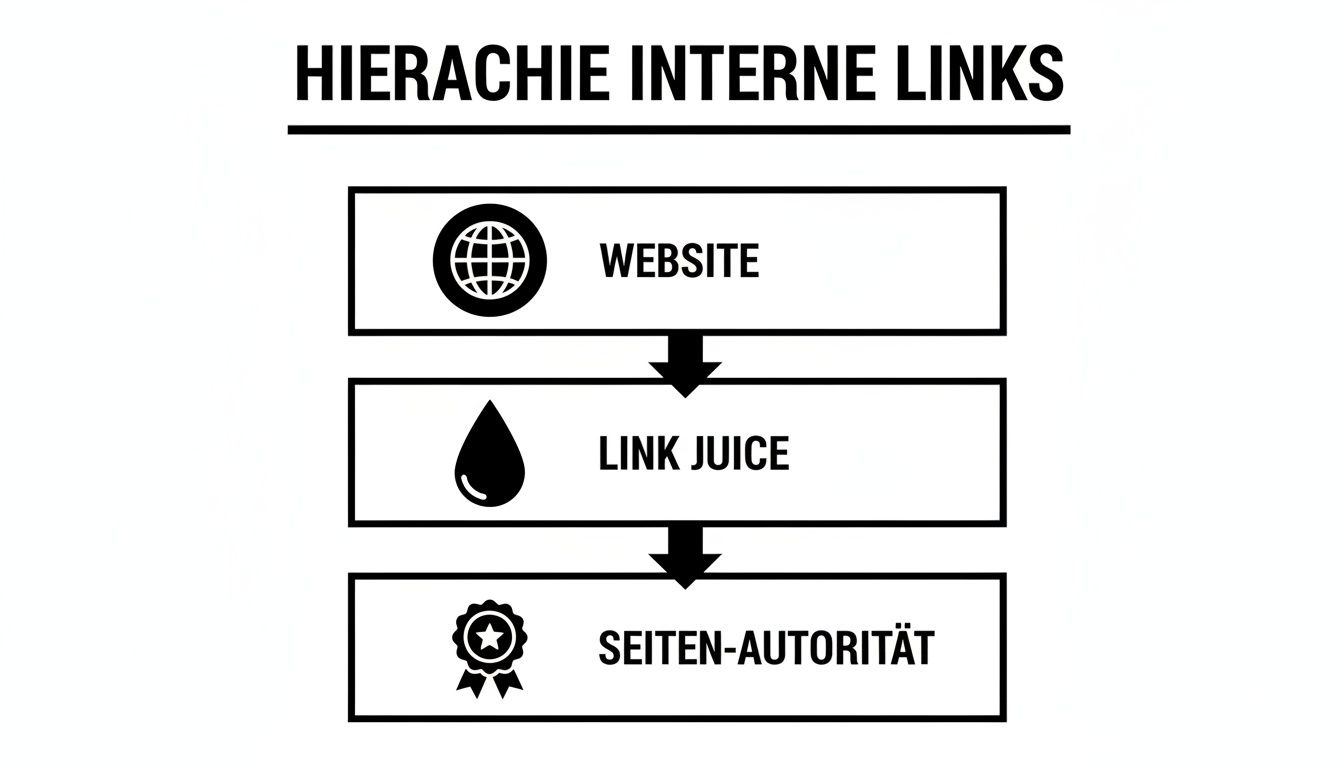
This clearly shows that a good structure is the basis for ensuring that link authority flows specifically to where it is intended to have the greatest impact, thus maximizing the SEO value of your most important pages.
A solid architecture is, of course, closely linked to technical SEO. It ensures that crawlers can efficiently access your site – the absolute prerequisite for successful indexing. A key tool that brings structure to this process is the XML sitemap. Learn more about how to create one. Create and optimally use a sitemap, you can find out more in our detailed guide.
Ultimately, your website architecture is far more than just a technical necessity. It's a strategic tool that allows you to direct the power of your internal links precisely where they will deliver the greatest commercial and strategic benefits – thus laying the foundation for sustainable SEO success.
Anchor texts that Google and users love
Anchor text is essentially the signpost for your internal links. It's the visible, clickable text that tells the user – and Google – what the link leads to. A vague "click here" is like a street sign without a place name. You don't know where it leads, so you usually ignore it.
Imagine you're reading an article about the best running shoes for beginners. A link with the text "our guide to trail running shoes" immediately provides clarity and context. It shows Google how the two pages are thematically related and gives the reader a real reason to click through. These small text snippets are an incredibly powerful tool for your Internal linking in SEO.

The different types of anchor text
Not all anchor text is created equal. For a natural and effective link structure, you need to know the different types and mix them cleverly. Those who act too one-sidedly risk being flagged as manipulative by Google.
Exact Match anchor text: The text is identical to the main keyword of the target page. For example, the link text "internal linking SEO" points to a page that is specifically designed to rank for that keyword. This is the most powerful approach, but it should be used judiciously.
Partial Match anchor text: Here, a variation of the keyword is included in the anchor text, for example, "Tips for your internal linking strategy." This appears much more natural and helps Google develop a broader understanding of the topic of your page.
Thematic anchor text (branded): Here, your brand or company name is simply used, like "learn more at LinkITUp". This is great for strengthening your brand authority.
Generic anchor text: These are the typical, meaningless phrases like "click here," "read more," or "go to the page." Avoid them! They offer absolutely no context and are a wasted opportunity.
The golden rule is quite simple: It's all about the mix! A healthy mix of exact, partial, and thematic anchor texts sends the signal of an organically grown link structure.
Here's how to get your anchor texts under control.
Optimizing anchor text is not a one-off task, but an ongoing process with enormous potential. Studies consistently show a strong correlation between a diverse internal anchor text structure and top rankings. Especially in Germany, where many websites have few external backlinks, a well-thought-out anchor text strategy is crucial. internal linking a real competitive advantage. Further insights are provided. This detailed article on internal linking on seobility.net.
Here are a few concrete examples of how you can do better:
Before (Bad):
- For more information, Click here.
- Read more about this topic at this page.
Afterwards (Good):
- Deepen your knowledge with our Guide to SEO analysis.
- Discover the Most common mistakes in keyword research.
Do you see the difference? The optimized versions are not only clearer for search engines, they also really make the user want to click.
Note: A good anchor text is short, concise, and accurately describes what the user can expect on the target page. It must also blend seamlessly into the sentence.
Crafting compelling anchor text isn't rocket science. It simply requires a little care and strategic thinking. Every optimized link is a small but important step towards strengthening your website's thematic authority and sending clear signals to Google and your visitors.
Strengthen your most important pages with internal links
It's quite clear: not every page of your website is equally important to your business. Some are simply more crucial than others. We often call them the "money pages"—the pages that directly generate revenue. Think of your product pages, your service offerings, or the central category pages in your online store. A smart approach Internal linking in SEO It focuses precisely on these aspects and makes them particularly strong.
The magic word here is Link Equity, Sometimes called "link juice," think of your website as an irrigation system. Some pages, perhaps an extremely popular blog post, receive plenty of water through numerous external links (backlinks). They have high authority. Your task is now to direct this "water" via internal links to where it's most needed: your commercially important money pages.
In practice, it often happens that informative blog articles diligently collect backlinks, while pure product pages go empty-handed. This is precisely where internal linking becomes your most important tool. You bridge this gap and shift authority to where it directly contributes to business success.
Identify your most important pages
Before you start distributing links, you obviously need to know which pages should receive the biggest boost. Which pages are absolutely critical to your success?
- Product and service pages: That's clear. This is where the purchases and inquiries take place. They are the beating heart of your company.
- Category pages: Especially in online shops or on large portals, these are the key elements that guide users to the right offers.
- Pages with high conversion potential: This can also include special landing pages for campaigns or pages that generate important leads, for example through a download.
Once you have this list, the second step is to find the pages on your website that already have the most authority. Tools like Ahrefs or the free Google Search Console They quickly show you which of your pages have the most backlinks. These are often comprehensive guides, case studies, or viral blog articles. From these high-performing pages, you then create targeted internal links to your money pages.
An internal link from a strong blog post to a product page is like a personal recommendation from your best salesperson. It signals to Google and users: "Here you'll find not only good information, but also the right offer to go with it."„
Strategic placement of links for maximum impact
Now it gets interesting, because not every internal link is created equal. The position of a link on a page is crucial in determining how much authority it conveys. Google gives significantly more weight to links that are prominently displayed in the user's field of view than to those hidden away in the fine print.
Here's a brief overview of which links have the greatest leverage:
This table shows different types of internal links and evaluates their respective SEO impact for prioritizing important pages.
Comparison of link types for page prioritization
| Link type | SEO impact | Best use case | Example |
|---|---|---|---|
| Main navigation | Very high | Linking to the most important money pages (e.g., top categories) | A link in the menu of "Women's Fashion" to the category page "Dresses". |
| Contextual links | High | Thematically relevant link from within the body text of a page. | A blog post about coffee beans links to a product page for a specific type of coffee. |
| Links from the homepage | Very high | Highlighting core offers or seasonal promotions. | A banner on the homepage links directly to the new summer collection. |
| Footer links | Small amount | Organizational pages that should be accessible from anywhere. | Links to "Legal Notice", "Contact" or "Terms and Conditions" in the footer of the website. |
As you can see, each link type has its justification and its specific strength.
By strategically using these different link types, you're not just building a random network, but a precise control instrument. You consciously direct authority to where it matters most, strengthen your revenue-generating pages, and clearly show Google what's important on your website. That's precisely the core of a professional strategy for Internal linking and SEO.
Identify and fix common errors in internal links
Even the cleverest strategy for the Internal linking in SEO It can fail due to simple technical errors. Think of it this way: every broken link is like a collapsed bridge in your own network of paths. For the Google bot, it's the end of the line, and for the user, it's simply frustrating. Such errors waste valuable link authority and prevent search engines from fully indexing your website.
An audit of internal links is therefore not a task to be done on a quiet day, but an absolutely critical step to secure your rankings. Fortunately, you don't have to click through every page manually. There are specialized SEO tools that can quickly uncover these problems.
Broken links and 404 errors: The most common culprits
The classic link error is a broken internal link. These are links that lead nowhere because the target page no longer exists. The result is the infamous [missing information]. 404 error ("Page not found"). This often happens when you delete pages or change URLs, but forget to update the links that pointed to them.
For Google's crawler, every 404 error is a clear stop sign. It follows the link, ends up in a dead end, and may even abort the crawl process at that point. The valuable "link juice" that should be flowing simply evaporates.
To systematically track down these errors, tools like Screaming Frog or Seobility are invaluable. They scan the entire website and list every outgoing link that returns a 404 status code. Once you have this list, the next step is to find the source pages and either remove the broken links or redirect them to a suitable, working page. You can find more detailed tactics for this in our guide on the topic. Fix 404 errors and minimize their impact.
Untangling forwarding chains and loops
Another, more hidden problem is redirect chains. Such a chain occurs when page A links to page B, which in turn redirects to page C, and so on. With each of these jumps, a tiny bit of link authority is lost. With long chains, this accumulates and, moreover, unnecessarily burdens Google's crawl budget.
Even worse is a redirect loop: Page A redirects to Page B, and Page B redirects directly back to Page A. In this case, neither the user nor the Google bot ever reaches their destination.
A technical audit is like a health check for your internal linking structure. It uncovers the hidden problems that are sabotaging your SEO performance in the background.
Here too, SEO crawlers are the best tools. They visualize these redirect paths and make it easy to track down the problematic chains. The solution is simple: All internal links should point directly to the final target URL to skip the unnecessary intermediate steps.
Bringing orphaned pages back online
An "orphan page" is a page that has no internal links pointing to it. For Google bots, such pages are practically invisible. Since crawlers follow the network of links to discover new content, pages without incoming links are difficult to find and index, or in the worst case, are not indexed at all.
Even if Google recognizes such a page via its XML sitemap, it lacks crucial contextual integration. Without internal links, no authority can flow from other pages to it, massively reducing its chances of a good ranking.
A crawling tool like the Screaming Frog SEO Spider finds orphaned pages by comparing the results of a website crawl with a complete list of URLs (e.g., from the sitemap or Google Analytics).
This image shows a typical overview in an SEO tool. It lists all URLs of a website with important data such as status code, indexability, and the number of inbound links. This allows you to immediately filter out pages with "0" inbound links and strategically integrate them into your link structure to ensure their visibility.
How important this is is demonstrated by a fascinating study from Zyppy in 2022, for which around 23 million internal links were analyzed. The result is clear: pages with 40 to 44 internal links Pages with only 0 to 4 links receive, on average, four times more clicks from Google search than pages with only 0 to 4 links. Considering that, according to SE Ranking, almost... 70 % of the websites pages without internal linking Once you have that, it becomes clear what enormous potential lies dormant here. More information can be found in the... Study results on internal linking on techwanderer.de.
Therefore, anyone who wants to unlock the full potential of their strategy for Internal linking and SEO Anyone who wants to fully exploit the potential cannot avoid regularly hunting down these technical errors.
The best tools to analyze and optimize your internal links
Manually reviewing internal links quickly becomes a Sisyphean task as soon as a website has more than just a handful of pages. Fortunately, there are ingenious tools that make our work as SEOs significantly easier. Which one is right for you ultimately depends on your budget and what exactly you want to find out.
To get started, a free but surprisingly powerful tool is often sufficient. This will give you a great feel for your link structure without spending a single cent.
Free tools for a quick overview
The Google Search Console (GSC) Every website owner should be aware of this – it's practically mandatory. Take a look at the "Links" report. There, under "Internal Links," you'll find a simple but invaluable list: the most frequently internally linked pages of your domain.
This is the perfect starting point. You'll immediately see whether your most important "money pages"—that is, the pages that are crucial for your business—are actually receiving the most attention through internal links.
- What she can do: Shows you the most frequently linked pages at a glance.
- What you can use them for: To quickly check if your link priorities align with your strategy.
Of course, there are many other smart helpers. We've compiled a hand-picked list of the best tools in our guide about... free SEO analysis tools Compiled for you.
Specialized crawlers for technical depth
If you want to delve really deep and track down technical errors like broken links or endless redirect chains, you can't avoid using a crawler. Screaming Frog SEO Spider This is something of a gold standard in the industry. Even the free version allows you to do up to... 500 Crawling URLs – for smaller websites, that's often more than enough.
Imagine the tool as a small Google bot that you control. It clicks its way through your entire website and spits out a detailed report at the end: every link, every status code, every redirect. This way, you can uncover technical problems that are affecting your website with just a few clicks. SEO power of your internal linking slow down.
All-in-one platforms for a comprehensive strategic overview
Those who want to keep the big picture in mind and not just fix individual errors should opt for a comprehensive SEO suite. Platforms like Ahrefs or Seobility They can do far more than just count links. Their site audits not only uncover problems with internal linking, but also prioritize them and provide clear instructions on what to do.
Such platforms are ideal for identifying strategic weaknesses before they negatively impact your ranking. They essentially create a map of your link architecture and show you exactly where the dead ends are.
Visual representations showing how "link juice" flows through your website are often particularly helpful. This allows you to immediately spot orphan pages that have no internal links or inefficient structures. While these tools do cost money, the strategic advantage they provide is often invaluable for growing businesses.
Still have questions? Here are the answers.
Even after the best instructions, a few questions often remain. No problem! Here I've compiled the most frequently asked questions about internal linking to clear up any remaining uncertainties and give you complete confidence in your own strategy.
How many internal links should a page have?
Unfortunately, there's no magic number here, but there are empirical values and clear trends. Analyses repeatedly show that pages with 40 to 50 internal links On average, they attract significantly more organic traffic than pages with only a handful of links. But beware: quality always trumps quantity.
The goal isn't to bombard a page with hundreds of links. It's far more important to link from thematically relevant pages where the click actually provides added value for the user. A good rule of thumb for a blog post? In a 1,000-word text, 5–10 well-placed internal links are a solid guideline.
Does a link in the navigation count the same as one in the text?
No, and the difference is crucial. Google pays the most attention to contextual links, meaning those that come directly from the body text. Why? Because they are surrounded by relevant content. This is a strong signal to the search engine that the linked page is truly relevant to the topic.
Links in the main navigation or footer are of course important. They give the website structure and show Google which pages are your most important. But when it comes to directing thematic authority to a specific subpage, links directly from within the content are simply unbeatable.
Think of it this way: A link in the main menu is like a major highway exit – it points the way to the city. A link in the text is like a local's recommendation for the best restaurant on a particular street – specific, relevant, and trustworthy.
Should I use the NoFollow attribute for internal links?
The answer is in 99 % of the cases: under no circumstances. The rel="nofollow""The `-` attribute is an instruction to search engines not to follow a link and not to pass on any authority (the famous "link juice") to it. This is the exact opposite of what we want to achieve with internal linking. We want to distribute authority and guide Google.
A nofollow This would completely negate all your SEO efforts at this point. The very rare exceptions? Perhaps a link to an internal login page that really shouldn't be indexed. But for linking between your blog articles, category pages, or product pages... nofollow taboo.
Do you want to ensure that your strategy is suitable for the Internal linking in SEO It contains no errors and delivers maximum success? LinkITUp is your experienced partner who unlocks the full potential of your website with precise analyses and tailor-made concepts. Talk to us.